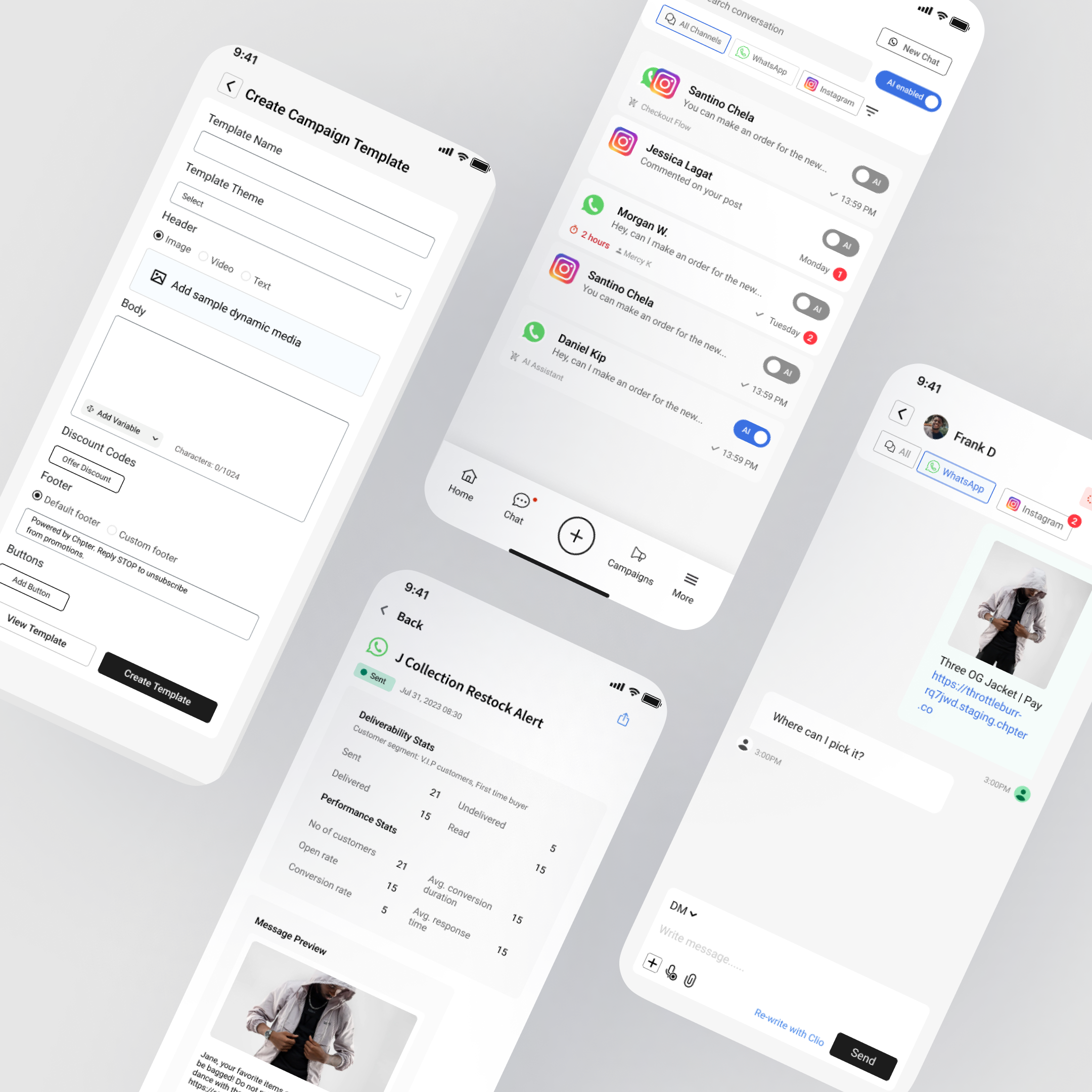
Chpter — Mobile App
Designed a native companion app that puts omnichannel management and WhatsApp campaigns in merchants' pockets — letting them run their store from anywhere.
< 3s
Reply from Notification
2 min
Campaign Creation
3 steps
Campaign Flow
iOS & Android
Platform
Overview
Chpter's web dashboard gave merchants powerful tools — but merchants aren't sitting at desktops all day. They're in their shops, on matatus, between deliveries.
The mobile app is a native companion that brings the most time-sensitive functions to their phone: managing conversations across WhatsApp, Instagram DM, and AI, running campaigns, handling orders, and monitoring performance — all without opening a laptop.
My Role
Lead Product Designer. Designed the end-to-end mobile experience. Defined which web features translated to mobile and which needed to be rethought entirely for a small screen and on-the-go context. Managed a design intern.
The Problem
Merchants were already managing their businesses from their phones — just not through Chpter. They were switching between WhatsApp, Instagram, email, and the Chpter web dashboard in a mobile browser that wasn't optimised for it.
- Missed messages — no push notifications from the web dashboard meant merchants were slow to respond to customers, especially after hours
- Campaign blindspot — merchants couldn't create or schedule WhatsApp campaigns without sitting at a computer, so most just didn't
- Context switching — jumping between native WhatsApp, Instagram, and a browser tab meant losing conversation threads and responding inconsistently
- Order delays — new orders came in but merchants didn't see them until they next checked the dashboard
The core insight: merchants' most urgent actions — responding to customers, catching new orders, sending campaigns — were happening on their phones. The tool they needed most wasn't on their phones.
The Strategy
This is not a shrunken dashboard. A companion app needs to answer one question: what does a merchant need to do right now, from their pocket?
Respond first, manage later
The inbox is the home screen, not a dashboard with charts. The most common action — replying to a customer — should take under 3 seconds from notification tap to sent message.
Push-driven, not browse-driven
Merchants don't open the app to explore. They open it because something happened — new message, new order, campaign results. Push notifications are the primary entry point, not the home screen.
Mobile-native, not mobile-responsive
Gestures, haptics, quick actions from notifications, share sheets. Design for how people actually use phones — one-handed, distracted, in bursts.
Campaigns that fit a commute
If a merchant can't create and schedule a campaign during a 10-minute matatu ride, the flow is too long.
The Process
Information Architecture — What Makes the Cut
- Must have on mobile: unified inbox, campaign creation, order management, push notifications, quick replies
- Nice to have: analytics overview, AI assistant configuration
- Desktop only: full reporting, onboarding setup, advanced store settings
- The rule: if it requires deep focus or a large screen, it stays on desktop. If it's urgent or time-sensitive, it goes mobile.
Unified Inbox on Mobile
- Conversation list shows channel badges (WhatsApp / Instagram / AI) inline — merchants scan and prioritise without tapping into each conversation
- Swipe gestures for quick actions: swipe right to mark as read, swipe left to assign or snooze
- Channel indicator persists at the top of every conversation so the merchant always knows where they're replying
- AI handoff banner: when the AI escalates, a summary card sits at the top showing what was discussed — full context before the merchant types a word
Campaign Builder for Mobile
- Step 1: Pick audience — visual segments ('recent buyers', 'abandoned cart') as tappable chips, not a form
- Step 2: Compose — message templates with tap-to-customise placeholders, media attachment via camera or gallery
- Step 3: Preview & send/schedule — full preview of what the customer sees, one-tap schedule with suggested times
- The entire flow fits within a single thumb-reachable zone. No scrolling past the fold to find the send button.
Push Notifications & Quick Actions
- New message: notification includes customer name, channel, and first line of message — long-press reveals quick reply with templates and free text
- New order: notification includes order total, item count, and a one-tap 'confirm order' action
- Campaign results: 'Your campaign reached 342 customers — 28 replied' with a tap to see details
- AI escalation: 'AI needs help with [customer name]' — tap goes directly to the conversation with AI summary visible
Order Management
- Order feed with status badges: new / confirmed / shipped / delivered
- Tap to view details, one-tap to confirm or mark as shipped
- Pull-to-refresh for real-time updates
- Badge count on the orders tab so merchants see pending orders at a glance
Analytics Overview
- Today's snapshot: messages received, response time, orders, revenue
- Campaign performance: last campaign's reach and reply rate
- AI stats: percentage handled by AI vs. escalated to human
- Tap any card to see more detail, or 'Open on desktop' link for full reports
The Solution
- Unified inbox — all conversations across WhatsApp, Instagram DM, and AI in one stream with channel badges, swipe actions, and AI handoff summaries
- Campaign builder — create, preview, and schedule WhatsApp campaigns in under 2 minutes from your phone
- Push notifications — actionable notifications with quick reply, order confirmation, and campaign results without opening the app
- Quick replies — message templates accessible with one tap during any conversation
- Order management — real-time order feed with one-tap confirmation and status tracking
- Analytics overview — glanceable daily snapshot of messages, orders, revenue, and AI performance
What I Learned
- A companion app is not a responsive dashboard. You have to kill features to make it useful — the hardest design decisions were what to leave out, not what to include.
- Push notifications are the real UI of a mobile app. If the notification itself isn't actionable, you've already lost the merchant's attention.
- Designing for Kenyan merchants means designing for Android-first, intermittent connectivity, and one-handed use while multitasking. Every interaction needs to survive a dropped connection and a distracted user.
- Quick replies and templates aren't a shortcut — for merchants responding to 50+ messages a day, they're the core interaction. I designed them as a first-class feature, not a tucked-away setting.
Project Gallery